Xarray Chunking Best Practices - dask_setup Recipe
This notebook demonstrates intelligent chunking strategies for xarray datasets, implementing the 256-512 MiB per chunk rule and comparing different approaches for optimal memory usage and performance.
Key Learning Points
How to choose optimal chunk sizes for your data
When to use
.chunk()vsrechunk_dataset()Memory-efficient chunking patterns
Impact of chunk size on performance
Bad vs good chunking patterns
Setup and Imports
Import necessary libraries and configure the environment.
import time
import warnings
from typing import Dict, List, Optional, Tuple

# Core imports
import numpy as np
import dask
import dask.array as da
import xarray as xr

from dask_setup import recommend_chunks, setup_dask_client, validate_chunks
import pandas as pd

# Optional dependencies
try:
    import rechunker
    RECHUNKER_AVAILABLE = True
    print("✅ rechunker available")
except ImportError:
    RECHUNKER_AVAILABLE = False
    print("⚠️  rechunker not available - some features will be skipped")

try:
    import matplotlib.pyplot as plt
    PLOTTING_AVAILABLE = True
    print("✅ matplotlib available for plotting")
except ImportError:
    PLOTTING_AVAILABLE = False
    print("⚠️  matplotlib not available - plotting disabled")

print("\n🚀 Setup complete!")
⚠️  rechunker not available - some features will be skipped
✅ matplotlib available for plotting

🚀 Setup complete!
Create Sample Dataset
Let’s create a sample climate-like dataset to work with.
def create_sample_dataset(shape=(365, 180, 360), dims=('time', 'lat', 'lon'), variables=None):
    """Create a sample xarray dataset for chunking demonstrations."""
    if variables is None:
        variables = ['temperature', 'precipitation']

    print(f"Creating sample dataset with shape: {shape}")
    print(f"Dimensions: {dims}")
    print(f"Variables: {variables}")

    # Create coordinates
    coords = {}
    if 'time' in dims:
        time_idx = dims.index('time')
        coords['time'] = pd.date_range('2000-01-01', periods=shape[time_idx], freq='D')

    if 'lat' in dims:
        lat_idx = dims.index('lat')
        coords['lat'] = np.linspace(-90, 90, shape[lat_idx])

    if 'lon' in dims:
        lon_idx = dims.index('lon')
        coords['lon'] = np.linspace(-180, 180, shape[lon_idx])

    # Create data variables
    data_vars = {}
    for var in variables:
        # Create realistic-looking data
        if var == 'temperature':
            data = da.random.random(shape, chunks=-1) * 50 - 10 + 273.15  # Kelvin (one chunk)
            attrs = {'units': 'K', 'long_name': 'Near-surface air temperature'}
        elif var == 'precipitation':
            data = da.random.exponential(scale=2.0, size=shape, chunks=-1)  # mm/day
            attrs = {'units': 'mm/day', 'long_name': 'Daily precipitation'}
        else:
            data = da.random.random(shape, chunks=-1)
            attrs = {'units': 'unknown', 'long_name': f'Sample variable {var}'}

        data_vars[var] = (dims, data, attrs)

    # Create dataset
    ds = xr.Dataset(data_vars, coords=coords)

    # Add global attributes
    ds.attrs['title'] = 'Sample climate dataset for chunking demonstrations'
    ds.attrs['created_by'] = 'dask_setup xarray chunking recipe'

    return ds

# Create our sample dataset
dataset_shape = (365, 180, 360)  # One year of daily global data
ds = create_sample_dataset(
    shape=dataset_shape,
    dims=('time', 'lat', 'lon'),
    variables=['temperature', 'precipitation']
)

print(f"\n📊 Dataset Information:")
print(f"   Shape: {ds.temperature.shape}")
print(f"   Size: {ds.nbytes / (1024**2):.1f} MB")
print(f"   Variables: {list(ds.data_vars.keys())}")
print(f"   Coordinates: {list(ds.coords.keys())}")

# Display the dataset
print("\nDataset summary:")
print(ds)

# The real-world target is 256-512 MiB per chunk, but this laptop-sized dataset is
# only ~180 MiB per variable, so at that target every strategy would say "one chunk".
# Scale the target down so the strategies have something to compare. On real data,
# use the default target_chunk_mb=(256, 512).
TARGET_MB = (32, 64)
print(f"\nDemo chunk target: {TARGET_MB[0]}-{TARGET_MB[1]} MiB")
Creating sample dataset with shape: (365, 180, 360)
Dimensions: ('time', 'lat', 'lon')
Variables: ['temperature', 'precipitation']

📊 Dataset Information:
   Shape: (365, 180, 360)
   Size: 360.9 MB
   Variables: ['temperature', 'precipitation']
   Coordinates: ['time', 'lat', 'lon']

Dataset summary:
<xarray.Dataset> Size: 378MB
Dimensions:        (time: 365, lat: 180, lon: 360)
Coordinates:
  * time           (time) datetime64[us] 3kB 2000-01-01 ... 2000-12-30
  * lat            (lat) float64 1kB -90.0 -88.99 -87.99 ... 87.99 88.99 90.0
  * lon            (lon) float64 3kB -180.0 -179.0 -178.0 ... 178.0 179.0 180.0
Data variables:
    temperature    (time, lat, lon) float64 189MB dask.array<chunksize=(365, 180, 360), meta=np.ndarray>
    precipitation  (time, lat, lon) float64 189MB dask.array<chunksize=(365, 180, 360), meta=np.ndarray>
Attributes:
    title:       Sample climate dataset for chunking demonstrations
    created_by:  dask_setup xarray chunking recipe

Demo chunk target: 32-64 MiB
Chunk Recommendations from dask_setup
recommend_chunks() sizes chunks from the dataset and the workers’ memory, and shapes them for the
workload type, matching the topology setup_dask_client() would start:
"cpu": square-ish blocks, good for computation"io": keep each time step whole and slice along time, good for streaming reads and writes"mixed": split spatial dimensions first, keep time long
Dimensions left out of the result stay whole.
chunk_strategies = {}
for workload in ["cpu", "io", "mixed"]:
    rec = recommend_chunks(ds, workload_type=workload, target_chunk_mb=TARGET_MB, verbose=False)
    # Spell out dimensions left whole, so every strategy lists all three
    chunk_strategies[f"optimal_{workload}"] = {dim: rec.get(dim, size) for dim, size in ds.sizes.items()}

print("📋 dask_setup's recommendations:")
for strategy, chunks in chunk_strategies.items():
    print(f"   {strategy:15s}: {chunks}")
📋 dask_setup's recommendations:
   optimal_cpu    : {'time': 182, 'lat': 180, 'lon': 180}
   optimal_io     : {'time': 129, 'lat': 180, 'lon': 360}
   optimal_mixed  : {'time': 365, 'lat': 90, 'lon': 180}
Chunking Analysis and Comparison
Let’s analyze different chunking options and compare their properties.
def estimate_chunk_memory(ds, chunks=None):
    """Estimate memory usage for each variable in the dataset."""
    estimates = {}

    for var_name, var in ds.data_vars.items():
        if chunks:
            # Apply chunking to get chunk info
            var_chunked = var.chunk(chunks)
            if hasattr(var_chunked.data, 'chunks'):
                # Calculate actual chunk sizes
                chunk_shapes = [tuple(c[0] if len(c) == 1 else max(c) for c in var_chunked.data.chunks)]
                if chunk_shapes:
                    chunk_elements = np.prod(chunk_shapes[0])
                    chunk_bytes = chunk_elements * np.dtype(var.dtype).itemsize
                    chunk_mb = chunk_bytes / (1024**2)
                    total_chunks = var_chunked.data.npartitions
                    total_mb = chunk_mb * total_chunks
                else:
                    chunk_mb = var.nbytes / (1024**2)
                    total_chunks = 1
                    total_mb = chunk_mb
            else:
                chunk_mb = var.nbytes / (1024**2)
                total_chunks = 1
                total_mb = chunk_mb
        else:
            # No chunking - single chunk
            chunk_mb = var.nbytes / (1024**2)
            total_chunks = 1
            total_mb = chunk_mb

        estimates[var_name] = {
            'chunk_mb': chunk_mb,
            'total_chunks': total_chunks,
            'total_mb': total_mb
        }

    return estimates


def analyze_chunking_options(ds: xr.Dataset, custom_chunks=None) -> Dict[str, Dict]:
    """Analyze different chunking options for a dataset."""

    # Define chunking options to test
    chunk_options = {
        **chunk_strategies,  # Our calculated optimal chunks
        "small_chunks": {dim: min(100, size // 10) for dim, size in ds.sizes.items()},
        "large_chunks": {dim: min(1000, size // 2) for dim, size in ds.sizes.items()},
        "time_continuous": {'time': ds.sizes['time'], 'lat': 90, 'lon': 180},
        "spatial_focus": {'time': 30, 'lat': 180, 'lon': 360}
    }

    if custom_chunks:
        chunk_options['custom'] = custom_chunks

    print("\n" + "=" * 60)
    print("📊 CHUNKING OPTIONS ANALYSIS")
    print("=" * 60)

    results = {}

    for option_name, chunks in chunk_options.items():
        print(f"\n🔍 Analyzing: {option_name}")

        try:
            # Estimate memory usage
            memory_estimates = estimate_chunk_memory(ds, chunks)

            # Calculate totals
            total_chunks = sum(est['total_chunks'] for est in memory_estimates.values())
            total_memory_mb = sum(est['total_mb'] for est in memory_estimates.values())
            avg_chunk_mb = np.mean([est['chunk_mb'] for est in memory_estimates.values()])

            # Assess chunk size quality
            lo, hi = TARGET_MB
            if lo <= avg_chunk_mb <= hi:
                quality = "✅ Optimal"
            elif lo / 2 <= avg_chunk_mb <= hi * 2:
                quality = "🟡 Acceptable"
            elif avg_chunk_mb < lo / 2:
                quality = "🔴 Too small (overhead issues)"
            else:
                quality = "🔴 Too large (memory issues)"

            results[option_name] = {
                'chunks': chunks,
                'total_chunks': total_chunks,
                'total_memory_mb': total_memory_mb,
                'avg_chunk_mb': avg_chunk_mb,
                'quality': quality,
                'memory_estimates': memory_estimates
            }

            print(f"   Chunks: {chunks}")
            print(f"   Total chunks: {total_chunks}")
            print(f"   Avg chunk size: {avg_chunk_mb:.1f} MB")
            print(f"   Total memory: {total_memory_mb:.1f} MB")
            print(f"   Quality: {quality}")

        except Exception as e:
            print(f"   ❌ Analysis failed: {e}")
            results[option_name] = {
                'error': str(e),
                'quality': '❌ Failed'
            }

    return results

# Analyze our chunking options
analysis_results = analyze_chunking_options(ds)

print("\n📋 Analysis Summary:")
for strategy, result in analysis_results.items():
    if 'error' not in result:
        print(f"   {strategy:20s} | {result['avg_chunk_mb']:6.1f} MB | {result['quality']}")
============================================================
📊 CHUNKING OPTIONS ANALYSIS
============================================================

🔍 Analyzing: optimal_cpu
   Chunks: {'time': 182, 'lat': 180, 'lon': 180}
   Total chunks: 12
   Avg chunk size: 45.0 MB
   Total memory: 539.9 MB
   Quality: ✅ Optimal

🔍 Analyzing: optimal_io
   Chunks: {'time': 129, 'lat': 180, 'lon': 360}
   Total chunks: 6
   Avg chunk size: 63.8 MB
   Total memory: 382.7 MB
   Quality: ✅ Optimal

🔍 Analyzing: optimal_mixed
   Chunks: {'time': 365, 'lat': 90, 'lon': 180}
   Total chunks: 8
   Avg chunk size: 45.1 MB
   Total memory: 360.9 MB
   Quality: ✅ Optimal

🔍 Analyzing: small_chunks
   Chunks: {'time': 36, 'lat': 18, 'lon': 36}
   Total chunks: 2200
   Avg chunk size: 0.2 MB
   Total memory: 391.6 MB
   Quality: 🔴 Too small (overhead issues)

🔍 Analyzing: large_chunks
   Chunks: {'time': 182, 'lat': 90, 'lon': 180}
   Total chunks: 24
   Avg chunk size: 22.5 MB
   Total memory: 539.9 MB
   Quality: 🟡 Acceptable

🔍 Analyzing: time_continuous
   Chunks: {'time': 365, 'lat': 90, 'lon': 180}
   Total chunks: 8
   Avg chunk size: 45.1 MB
   Total memory: 360.9 MB
   Quality: ✅ Optimal

🔍 Analyzing: spatial_focus
   Chunks: {'time': 30, 'lat': 180, 'lon': 360}
   Total chunks: 26
   Avg chunk size: 14.8 MB
   Total memory: 385.6 MB
   Quality: 🔴 Too small (overhead issues)

📋 Analysis Summary:
   optimal_cpu          |   45.0 MB | ✅ Optimal
   optimal_io           |   63.8 MB | ✅ Optimal
   optimal_mixed        |   45.1 MB | ✅ Optimal
   small_chunks         |    0.2 MB | 🔴 Too small (overhead issues)
   large_chunks         |   22.5 MB | 🟡 Acceptable
   time_continuous      |   45.1 MB | ✅ Optimal
   spatial_focus        |   14.8 MB | 🔴 Too small (overhead issues)
Performance Benchmarking
Let’s benchmark the performance of different chunking strategies using actual computations.
# Set up a Dask client for benchmarking
client, cluster, temp_dir = setup_dask_client(
    workload_type="mixed",
    max_workers=4,
    dashboard=True
)

print(f"✅ Cluster created with {len(client.nthreads())} workers")
print(f"   Dashboard: {client.dashboard_link}")
print(f"   Temp directory: {temp_dir}")


def benchmark_chunking_performance(
    ds: xr.Dataset,
    chunk_options: Dict[str, Dict[str, int]],
    operation: str = "mean"
) -> Dict[str, float]:
    """Benchmark performance of different chunking strategies."""

    print(f"\n⚡ PERFORMANCE BENCHMARK - {operation.upper()} OPERATION")
    print("=" * 50)

    results = {}

    for option_name, chunks in chunk_options.items():
        if chunks is None or 'error' in str(chunks):
            continue

        print(f"\n🏃 Testing: {option_name}")

        try:
            # Apply chunking
            chunked_ds = ds.chunk(chunks)

            # Select temperature variable for testing
            data_var = chunked_ds['temperature']

            # Define the operation
            if operation == "mean":
                computation = lambda: data_var.mean().compute()
            elif operation == "sum":
                computation = lambda: data_var.sum().compute()
            elif operation == "std":
                computation = lambda: data_var.std().compute()
            elif operation == "spatial_mean":
                computation = lambda: data_var.mean(['lat', 'lon']).compute()
            else:
                print(f"   Unknown operation: {operation}")
                continue

            # Warm up (first run can be slower)
            print("   Warming up...")
            try:
                _ = computation()
            except Exception as e:
                print(f"   Warmup failed: {e}")
                continue

            # Benchmark the operation
            print("   Running benchmark...")
            start_time = time.time()
            result = computation()
            elapsed_time = time.time() - start_time

            results[option_name] = elapsed_time
            # spatial_mean returns a time series; summarise it as one number
            print(f"   Result: {float(result.mean()):.6f}")
            print(f"   Time: {elapsed_time:.3f}s")

        except Exception as e:
            print(f"   ❌ Benchmark failed: {e}")
            results[option_name] = float('inf')

    return results


# Get valid chunking options (exclude errors)
valid_chunk_options = {
    k: v['chunks'] for k, v in analysis_results.items()
    if 'error' not in v and v['chunks'] is not None
}

# Benchmark different operations
operations = ['mean', 'spatial_mean', 'std']
benchmark_results = {}

for operation in operations:
    print(f"\n🎯 Benchmarking {operation} operation...")
    benchmark_results[operation] = benchmark_chunking_performance(
        ds, valid_chunk_options, operation
    )

# Display benchmark summary
print("\n" + "=" * 60)
print("🏁 BENCHMARK SUMMARY")
print("=" * 60)

for operation, results in benchmark_results.items():
    print(f"\n{operation.upper()} Operation:")
    valid_results = {k: v for k, v in results.items() if v != float('inf')}
    if valid_results:
        best_time = min(valid_results.values())
        sorted_results = sorted(valid_results.items(), key=lambda x: x[1])

        for strategy, time_s in sorted_results:
            relative_speed = time_s / best_time
            print(f"   {strategy:20s} | {time_s:6.3f}s | {relative_speed:4.2f}x")
    else:
        print("   No valid results")
[setup_dask_client] Configuration summary
temp/spill dir: /tmp/dask-2802
Workers: 2 | threads/worker: 2 | processes: True
Memory: total ~15.6 GiB | usable ~11.6 GiB | per-worker ~5.8 GiB
Compression: spill=auto | comm=False
✅ Cluster created with 2 workers
   Dashboard: http://127.0.0.1:35981/status
   Temp directory: /tmp/dask-2802

🎯 Benchmarking mean operation...

⚡ PERFORMANCE BENCHMARK - MEAN OPERATION
==================================================

🏃 Testing: optimal_cpu
   Warming up...
Running benchmark...
   Result: 288.149274
   Time: 0.350s

🏃 Testing: optimal_io
   Warming up...
Running benchmark...
   Result: 288.149274
   Time: 0.714s

🏃 Testing: optimal_mixed
   Warming up...
Running benchmark...
   Result: 288.149274
   Time: 0.346s

🏃 Testing: small_chunks
   Warming up...
Running benchmark...
   Result: 288.149274
   Time: 3.045s

🏃 Testing: large_chunks
   Warming up...
Running benchmark...
   Result: 288.149274
   Time: 0.382s

🏃 Testing: time_continuous
   Warming up...
Running benchmark...
   Result: 288.149274
   Time: 0.338s

🏃 Testing: spatial_focus
   Warming up...
Running benchmark...
   Result: 288.149274
   Time: 0.398s

🎯 Benchmarking spatial_mean operation...

⚡ PERFORMANCE BENCHMARK - SPATIAL_MEAN OPERATION
==================================================

🏃 Testing: optimal_cpu
   Warming up...
Running benchmark...
   Result: 288.149274
   Time: 0.353s

🏃 Testing: optimal_io
   Warming up...
Running benchmark...
   Result: 288.149274
   Time: 0.359s

🏃 Testing: optimal_mixed
   Warming up...
Running benchmark...
   Result: 288.149274
   Time: 0.338s

🏃 Testing: small_chunks
   Warming up...
Running benchmark...
   Result: 288.149274
   Time: 3.378s

🏃 Testing: large_chunks
   Warming up...
Running benchmark...
   Result: 288.149274
   Time: 0.391s

🏃 Testing: time_continuous
   Warming up...
Running benchmark...
   Result: 288.149274
   Time: 0.339s

🏃 Testing: spatial_focus
   Warming up...
Running benchmark...
   Result: 288.149274
   Time: 0.357s

🎯 Benchmarking std operation...

⚡ PERFORMANCE BENCHMARK - STD OPERATION
==================================================

🏃 Testing: optimal_cpu
   Warming up...
Running benchmark...
   Result: 14.432787
   Time: 0.423s

🏃 Testing: optimal_io
   Warming up...
Running benchmark...
   Result: 14.432787
   Time: 0.461s

🏃 Testing: optimal_mixed
   Warming up...
Running benchmark...
   Result: 14.432787
   Time: 0.432s

🏃 Testing: small_chunks
   Warming up...
Running benchmark...
   Result: 14.432787
   Time: 3.179s

🏃 Testing: large_chunks
   Warming up...
Running benchmark...
   Result: 14.432787
   Time: 0.450s

🏃 Testing: time_continuous
   Warming up...
Running benchmark...
   Result: 14.432787
   Time: 0.411s

🏃 Testing: spatial_focus
   Warming up...
Running benchmark...
   Result: 14.432787
   Time: 0.462s

============================================================
🏁 BENCHMARK SUMMARY
============================================================

MEAN Operation:
   time_continuous      |  0.338s | 1.00x
   optimal_mixed        |  0.346s | 1.03x
   optimal_cpu          |  0.350s | 1.04x
   large_chunks         |  0.382s | 1.13x
   spatial_focus        |  0.398s | 1.18x
   optimal_io           |  0.714s | 2.12x
   small_chunks         |  3.045s | 9.02x

SPATIAL_MEAN Operation:
   optimal_mixed        |  0.338s | 1.00x
   time_continuous      |  0.339s | 1.00x
   optimal_cpu          |  0.353s | 1.04x
   spatial_focus        |  0.357s | 1.06x
   optimal_io           |  0.359s | 1.06x
   large_chunks         |  0.391s | 1.16x
   small_chunks         |  3.378s | 9.99x

STD Operation:
   time_continuous      |  0.411s | 1.00x
   optimal_cpu          |  0.423s | 1.03x
   optimal_mixed        |  0.432s | 1.05x
   large_chunks         |  0.450s | 1.10x
   optimal_io           |  0.461s | 1.12x
   spatial_focus        |  0.462s | 1.12x
   small_chunks         |  3.179s | 7.73x
Chunking Visualization
Let’s visualize the chunk structure and performance results.
if PLOTTING_AVAILABLE:
    import matplotlib.pyplot as plt
    import numpy as np

    # Create visualization of chunk sizes and performance
    fig, (ax1, ax2) = plt.subplots(1, 2, figsize=(15, 6))

    # Plot 1: Chunk sizes comparison
    strategies = []
    chunk_sizes = []
    colors = []

    for strategy, result in analysis_results.items():
        if 'error' not in result:
            strategies.append(strategy)
            chunk_sizes.append(result['avg_chunk_mb'])

            # Color code based on quality
            if '✅' in result['quality']:
                colors.append('green')
            elif '🟡' in result['quality']:
                colors.append('orange')
            else:
                colors.append('red')

    # Create bar plot
    bars = ax1.bar(range(len(strategies)), chunk_sizes, color=colors, alpha=0.7)
    ax1.set_xlabel('Chunking Strategy')
    ax1.set_ylabel('Average Chunk Size (MB)')
    ax1.set_title('Chunk Size Comparison')
    ax1.set_xticks(range(len(strategies)))
    ax1.set_xticklabels(strategies, rotation=45, ha='right')

    # Add optimal range shading
    ax1.axhspan(*TARGET_MB, alpha=0.2, color='green', label=f'Demo target ({TARGET_MB[0]}-{TARGET_MB[1]} MiB)')
    ax1.legend()

    # Add value labels on bars
    for bar, size in zip(bars, chunk_sizes):
        ax1.text(bar.get_x() + bar.get_width()/2, bar.get_height() + 10,
                f'{size:.1f}', ha='center', va='bottom', fontsize=8)

    # Plot 2: Performance comparison (using mean operation)
    if 'mean' in benchmark_results:
        perf_data = benchmark_results['mean']
        valid_perf = {k: v for k, v in perf_data.items() if v != float('inf')}

        if valid_perf:
            perf_strategies = list(valid_perf.keys())
            perf_times = list(valid_perf.values())

            # Normalize to show relative performance
            best_time = min(perf_times)
            relative_times = [t / best_time for t in perf_times]

            bars2 = ax2.bar(range(len(perf_strategies)), relative_times,
                           color='skyblue', alpha=0.7)
            ax2.set_xlabel('Chunking Strategy')
            ax2.set_ylabel('Relative Performance (lower is better)')
            ax2.set_title('Performance Comparison (Mean Operation)')
            ax2.set_xticks(range(len(perf_strategies)))
            ax2.set_xticklabels(perf_strategies, rotation=45, ha='right')

            # Add value labels
            for bar, time_val in zip(bars2, relative_times):
                ax2.text(bar.get_x() + bar.get_width()/2, bar.get_height() + 0.05,
                        f'{time_val:.2f}x', ha='center', va='bottom', fontsize=8)
    else:
        ax2.text(0.5, 0.5, 'No performance data available',
                ha='center', va='center', transform=ax2.transAxes)
        ax2.set_title('Performance Comparison')

    plt.tight_layout()
    plt.show()

else:
    print("📊 Plotting not available (matplotlib not installed)")
    print("   Install matplotlib to see chunk size and performance visualizations")
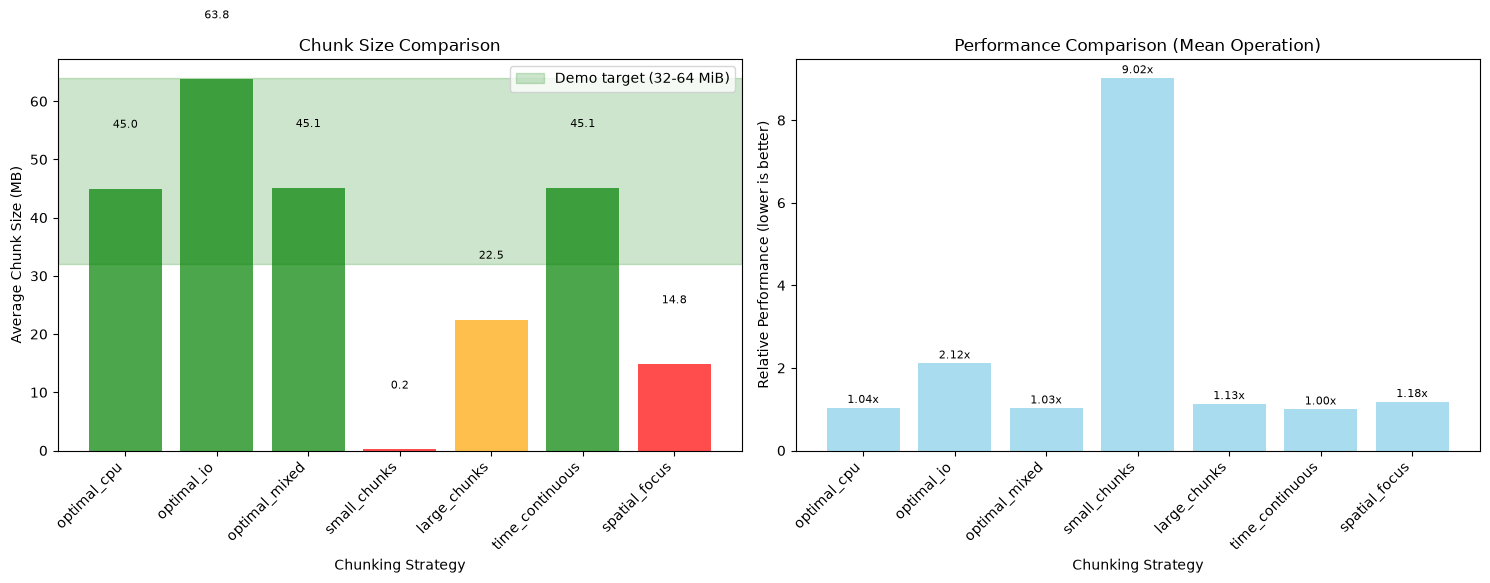
Rechunking Demonstration
Use rechunk_dataset() from dask_setup to safely rechunk large datasets.
It uses the rechunker library when available and compatible, and automatically
falls back to xarray.to_zarr() on environments where rechunker is incompatible
with the installed xarray version (e.g. NCI Gadi’s analysis3 environments).
from dask_setup import rechunk_dataset
import tempfile

def demonstrate_rechunking(ds, source_chunks, target_chunks, client, dask_tmp):
    """Demonstrate rechunking with rechunk_dataset()."""
    print("\n🔄 RECHUNKING DEMONSTRATION")
    print("=" * 40)

    source_ds = ds.chunk(source_chunks)
    print(f"Source chunks: {source_chunks}")
    print(f"Target chunks: {target_chunks}")

    # rechunk_dataset handles rechunker/xarray compatibility automatically.
    # If rechunker is incompatible (e.g. newer xarray requires zarr_format),
    # it falls back to native xarray.to_zarr() with no API change.
    ds_rechunked = rechunk_dataset(
        source_ds,
        target_chunks=target_chunks,
        client=client,
        dask_tmp=dask_tmp,
    )

    print(f"✅ Rechunked successfully")
    print(f"   New chunks: {dict(ds_rechunked.chunks)}")
    return ds_rechunked


if RECHUNKER_AVAILABLE:
    # One day per chunk -> 30 days per chunk, staged through dask_tmp
    ds_rechunked = demonstrate_rechunking(
        ds,
        source_chunks={'time': 1, 'lat': 90, 'lon': 180},
        target_chunks={'time': 30, 'lat': 90, 'lon': 180},
        client=client,
        dask_tmp=temp_dir,
    )
else:
    print("rechunker not installed — pip install rechunker zarr to run this demo")
rechunker not installed — pip install rechunker zarr to run this demo
Chunking Best Practices Guide
Based on our analysis, here are the key best practices for xarray chunking:
def print_chunking_best_practices():
    """Print comprehensive chunking best practices."""
    print("\n" + "=" * 60)
    print("💡 XARRAY CHUNKING BEST PRACTICES")
    print("=" * 60)

    print("""
🎯 OPTIMAL CHUNK SIZE RULE:
   • Target: 256-512 MB per chunk
   • Avoid: <100 MB (too much overhead) or >1 GB (memory issues)
   • Monitor: Actual memory usage vs estimates

📐 CHUNK SHAPE STRATEGIES:

   CPU-Intensive Workloads:
   • Square-ish chunks for better cache locality
   • Balance dimensions equally when possible
   • Example: (500, 500, 10) rather than (100, 100, 500)

   I/O-Intensive Workloads:
   • Preserve natural access patterns
   • Keep record dimensions (time) lightly chunked
   • Example: (365, 180, 90) for daily global data

   Mixed Workloads:
   • Mixed approach based on operation types
   • Consider downstream processing patterns

🔄 RECHUNKING STRATEGIES:

   Use .chunk() when:
   • Initial chunking for analysis
   • Simple chunk size adjustments
   • Interactive exploration

   Use rechunk_dataset() when:
   • Major chunk structure changes (writes to Zarr on fast local storage)
   • Large datasets (>1 GB) — handles rechunker/xarray compatibility
   • Need to persist rechunked data to disk for repeated access

⚠️  COMMON PITFALLS:

   BAD Chunking Examples:
   • Too small: (10, 10, 10) → ~8KB chunks (high overhead)
   • Too large: (5000, 5000, 100) → ~20GB chunks (memory issues)
   • Unbalanced: (1, 3600, 1800) → inefficient parallelization

   GOOD Chunking Examples:
   • Balanced: (240, 512, 512) → ~512MB chunks
   • Time-aware: (365, 180, 90) → preserves daily records
   • Analysis-optimized: (100, 500, 500) → good for spatial ops

🔧 CONFIGURATION EXAMPLES:

   # For large climate datasets
   ds.chunk({"time": 365, "lat": 180, "lon": 360})  # ~190MB chunks (float64)

   # For high-resolution spatial data
   ds.chunk({"time": 30, "y": 1000, "x": 1000})   # ~240MB chunks

   # For time series analysis
   ds.chunk({"time": -1, "station": 100})          # Keep time continuous

📊 MEMORY CALCULATION:
   chunk_bytes = chunk_elements × dtype_size

   Example: (500, 500, 10) float64 array
   = 500 × 500 × 10 × 8 bytes = 20MB (too small)

   Better: (500, 500, 100) float64 array
   = 500 × 500 × 100 × 8 bytes = 200MB ✓ (acceptable)
""")

# Display the best practices
print_chunking_best_practices()
============================================================
💡 XARRAY CHUNKING BEST PRACTICES
============================================================

🎯 OPTIMAL CHUNK SIZE RULE:
   • Target: 256-512 MB per chunk
   • Avoid: <100 MB (too much overhead) or >1 GB (memory issues)
   • Monitor: Actual memory usage vs estimates

📐 CHUNK SHAPE STRATEGIES:

   CPU-Intensive Workloads:
   • Square-ish chunks for better cache locality
   • Balance dimensions equally when possible
   • Example: (500, 500, 10) rather than (100, 100, 500)

   I/O-Intensive Workloads:
   • Preserve natural access patterns
   • Keep record dimensions (time) lightly chunked
   • Example: (365, 180, 90) for daily global data

   Mixed Workloads:
   • Mixed approach based on operation types
   • Consider downstream processing patterns

🔄 RECHUNKING STRATEGIES:

   Use .chunk() when:
   • Initial chunking for analysis
   • Simple chunk size adjustments
   • Interactive exploration

   Use rechunk_dataset() when:
   • Major chunk structure changes (writes to Zarr on fast local storage)
   • Large datasets (>1 GB) — handles rechunker/xarray compatibility
   • Need to persist rechunked data to disk for repeated access

⚠️  COMMON PITFALLS:

   BAD Chunking Examples:
   • Too small: (10, 10, 10) → ~8KB chunks (high overhead)
   • Too large: (5000, 5000, 100) → ~20GB chunks (memory issues)
   • Unbalanced: (1, 3600, 1800) → inefficient parallelization

   GOOD Chunking Examples:
   • Balanced: (240, 512, 512) → ~512MB chunks
   • Time-aware: (365, 180, 90) → preserves daily records
   • Analysis-optimized: (100, 500, 500) → good for spatial ops

🔧 CONFIGURATION EXAMPLES:

   # For large climate datasets
   ds.chunk({"time": 365, "lat": 180, "lon": 360})  # ~190MB chunks (float64)

   # For high-resolution spatial data
   ds.chunk({"time": 30, "y": 1000, "x": 1000})   # ~240MB chunks

   # For time series analysis
   ds.chunk({"time": -1, "station": 100})          # Keep time continuous

📊 MEMORY CALCULATION:
   chunk_bytes = chunk_elements × dtype_size

   Example: (500, 500, 10) float64 array
   = 500 × 500 × 10 × 8 bytes = 20MB (too small)

   Better: (500, 500, 100) float64 array
   = 500 × 500 × 100 × 8 bytes = 200MB ✓ (acceptable)
Summary Comparison Table
Let’s create a comprehensive comparison table of all our chunking strategies.
def create_chunking_comparison_table(analysis_results, benchmark_results=None):
    """Create a comprehensive comparison table."""
    print("\n" + "=" * 80)
    print("📋 COMPREHENSIVE CHUNKING STRATEGY COMPARISON")
    print("=" * 80)

    # Prepare headers
    headers = ["Strategy", "Chunks", "Avg Size (MB)", "Total Chunks", "Quality"]

    # Add performance columns if available
    if benchmark_results and 'mean' in benchmark_results:
        headers.extend(["Mean Time (s)", "Relative Speed"])

    # Prepare data
    table_data = []

    # Get best performance for relative comparison
    best_time = None
    if benchmark_results and 'mean' in benchmark_results:
        valid_times = [t for t in benchmark_results['mean'].values() if t != float('inf')]
        if valid_times:
            best_time = min(valid_times)

    # Sort strategies by chunk size (optimal range first)
    sorted_strategies = sorted(
        analysis_results.items(),
        key=lambda x: abs(x[1].get('avg_chunk_mb', 1000) - sum(TARGET_MB) / 2)  # middle of target range
    )

    for strategy, data in sorted_strategies:
        if 'error' in data:
            continue

        # Format chunks dictionary
        chunks_str = ", ".join([f"{k}:{v}" for k, v in data['chunks'].items()])
        if len(chunks_str) > 25:
            chunks_str = chunks_str[:22] + "..."

        row = [
            strategy,
            chunks_str,
            f"{data['avg_chunk_mb']:.1f}",
            str(data['total_chunks']),
            data['quality']
        ]

        # Add performance data if available
        if benchmark_results and 'mean' in benchmark_results:
            if strategy in benchmark_results['mean']:
                time_val = benchmark_results['mean'][strategy]
                if time_val != float('inf') and best_time:
                    relative_speed = time_val / best_time
                    row.extend([f"{time_val:.3f}", f"{relative_speed:.2f}x"])
                else:
                    row.extend(["Failed", "N/A"])
            else:
                row.extend(["-", "-"])

        table_data.append(row)

    # Print table with proper formatting
    if table_data:
        # Calculate column widths
        col_widths = []
        for i in range(len(headers)):
            col_width = max(
                len(headers[i]),
                max(len(str(row[i])) for row in table_data if len(row) > i)
            )
            col_widths.append(col_width)

        # Print header
        header_row = " | ".join(headers[i].ljust(col_widths[i]) for i in range(len(headers)))
        print(f"| {header_row} |")
        print("|" + "|".join("-" * (w + 2) for w in col_widths) + "|")

        # Print data rows
        for row in table_data:
            # Pad row if needed
            while len(row) < len(headers):
                row.append("-")

            data_row = " | ".join(str(row[i]).ljust(col_widths[i]) for i in range(len(headers)))
            print(f"| {data_row} |")
    else:
        print("No valid results to display")

    # Add interpretation guide
    print("\n💡 Interpretation Guide:")
    print(f"   • Demo target: {TARGET_MB[0]}-{TARGET_MB[1]} MiB (use 256-512 MiB on real data)")
    print("   • Quality indicators: ✅ Optimal, 🟡 Acceptable, 🔴 Problematic")
    print("   • Lower relative speed is better (1.0x = fastest)")
    print("   • Choose strategy based on your specific workload")

# Create the comprehensive comparison table
create_chunking_comparison_table(analysis_results, benchmark_results)

# Clean up the cluster
client.close()
cluster.close()
print("\n🧹 Cluster cleaned up")
================================================================================
📋 COMPREHENSIVE CHUNKING STRATEGY COMPARISON
================================================================================
| Strategy        | Chunks                    | Avg Size (MB) | Total Chunks | Quality                       | Mean Time (s) | Relative Speed |
|-----------------|---------------------------|---------------|--------------|-------------------------------|---------------|----------------|
| optimal_mixed   | time:365, lat:90, lon:180 | 45.1          | 8            | ✅ Optimal                     | 0.346         | 1.03x          |
| time_continuous | time:365, lat:90, lon:180 | 45.1          | 8            | ✅ Optimal                     | 0.338         | 1.00x          |
| optimal_cpu     | time:182, lat:180, lon... | 45.0          | 12           | ✅ Optimal                     | 0.350         | 1.04x          |
| optimal_io      | time:129, lat:180, lon... | 63.8          | 6            | ✅ Optimal                     | 0.714         | 2.12x          |
| large_chunks    | time:182, lat:90, lon:180 | 22.5          | 24           | 🟡 Acceptable                  | 0.382         | 1.13x          |
| spatial_focus   | time:30, lat:180, lon:360 | 14.8          | 26           | 🔴 Too small (overhead issues) | 0.398         | 1.18x          |
| small_chunks    | time:36, lat:18, lon:36   | 0.2           | 2200         | 🔴 Too small (overhead issues) | 3.045         | 9.02x          |

💡 Interpretation Guide:
   • Demo target: 32-64 MiB (use 256-512 MiB on real data)
   • Quality indicators: ✅ Optimal, 🟡 Acceptable, 🔴 Problematic
   • Lower relative speed is better (1.0x = fastest)
   • Choose strategy based on your specific workload

🧹 Cluster cleaned up
Personalized Recommendations
Based on our analysis, here are specific recommendations for your dataset:
def generate_recommendations(analysis_results, benchmark_results=None):
    """Generate personalized chunking recommendations."""
    print("\n" + "=" * 60)
    print("🎯 PERSONALIZED RECOMMENDATIONS")
    print("=" * 60)

    # Find the best strategies
    optimal_strategies = []
    acceptable_strategies = []

    for strategy, data in analysis_results.items():
        if 'error' not in data:
            if '✅' in data['quality']:
                optimal_strategies.append((strategy, data))
            elif '🟡' in data['quality']:
                acceptable_strategies.append((strategy, data))

    # Find fastest strategy if performance data is available
    fastest_strategy = None
    if benchmark_results and 'mean' in benchmark_results:
        valid_times = {k: v for k, v in benchmark_results['mean'].items() if v != float('inf')}
        if valid_times:
            fastest_strategy = min(valid_times.items(), key=lambda x: x[1])

    print(f"\n📊 For your dataset (shape: {ds.temperature.shape}, size: {ds.nbytes/(1024**2):.1f} MB):")

    if optimal_strategies:
        print(f"\n✅ OPTIMAL STRATEGIES ({len(optimal_strategies)} found):")
        for strategy, data in optimal_strategies:
            print(f"   • {strategy}: {data['chunks']} → {data['avg_chunk_mb']:.1f} MB chunks")

            # Add context about when to use this strategy
            if 'cpu' in strategy:
                print(f"     → Use for: Heavy computations, mathematical operations")
            elif 'io' in strategy:
                print(f"     → Use for: File I/O operations, data loading/saving")
            elif 'mixed' in strategy:
                print(f"     → Use for: Mixed workloads, general analysis")
            elif 'time_continuous' in strategy:
                print(f"     → Use for: Time series analysis, temporal operations")
            elif 'spatial_focus' in strategy:
                print(f"     → Use for: Spatial analysis, geographical operations")
    else:
        print("\n🟡 No optimal strategies found. Acceptable alternatives:")

    if acceptable_strategies:
        if optimal_strategies:
            print(f"\n🟡 ACCEPTABLE ALTERNATIVES ({len(acceptable_strategies)} found):")
        for strategy, data in acceptable_strategies[:3]:  # Show top 3
            print(f"   • {strategy}: {data['chunks']} → {data['avg_chunk_mb']:.1f} MB chunks")

    # Performance recommendation
    if fastest_strategy:
        strategy_name, best_time = fastest_strategy
        print(f"\n⚡ FASTEST STRATEGY: {strategy_name} ({best_time:.3f}s for mean operation)")
        if strategy_name in analysis_results:
            print(f"   Configuration: {analysis_results[strategy_name]['chunks']}")

    # Specific use case recommendations
    print(f"\n🔧 SPECIFIC USE CASE RECOMMENDATIONS:")

    print(f"\n   For Time Series Analysis:")
    if 'time_continuous' in analysis_results:
        time_config = analysis_results['time_continuous']['chunks']
        print(f"     ds.chunk({time_config})")
    else:
        print(f"     ds.chunk({{'time': -1, 'lat': 90, 'lon': 180}})  # Keep time continuous")

    print(f"\n   For Spatial Analysis:")
    if 'spatial_focus' in analysis_results:
        spatial_config = analysis_results['spatial_focus']['chunks']
        print(f"     ds.chunk({spatial_config})")
    else:
        print(f"     ds.chunk({{'time': 30, 'lat': -1, 'lon': -1}})  # Keep spatial dims continuous")

    print(f"\n   For General Computing:")
    if optimal_strategies:
        best_general = optimal_strategies[0][1]['chunks']
        print(f"     ds.chunk({best_general})")
    elif acceptable_strategies:
        best_general = acceptable_strategies[0][1]['chunks']
        print(f"     ds.chunk({best_general})")

    # Memory considerations
    print(f"\n💾 MEMORY CONSIDERATIONS:")
    print(f"   • Your dataset: {ds.nbytes/(1024**3):.2f} GB total")
    print(f"   • Recommended worker memory: 4-8 GB per worker")
    print(f"   • Leave reserve_mem_gb at its default (20% of RAM, 4-50 GB) unless you've measured otherwise")

# Generate recommendations
generate_recommendations(analysis_results, benchmark_results)
============================================================
🎯 PERSONALIZED RECOMMENDATIONS
============================================================

📊 For your dataset (shape: (365, 180, 360), size: 360.9 MB):

✅ OPTIMAL STRATEGIES (4 found):
   • optimal_cpu: {'time': 182, 'lat': 180, 'lon': 180} → 45.0 MB chunks
     → Use for: Heavy computations, mathematical operations
   • optimal_io: {'time': 129, 'lat': 180, 'lon': 360} → 63.8 MB chunks
     → Use for: File I/O operations, data loading/saving
   • optimal_mixed: {'time': 365, 'lat': 90, 'lon': 180} → 45.1 MB chunks
     → Use for: Mixed workloads, general analysis
   • time_continuous: {'time': 365, 'lat': 90, 'lon': 180} → 45.1 MB chunks
     → Use for: Time series analysis, temporal operations

🟡 ACCEPTABLE ALTERNATIVES (1 found):
   • large_chunks: {'time': 182, 'lat': 90, 'lon': 180} → 22.5 MB chunks

⚡ FASTEST STRATEGY: time_continuous (0.338s for mean operation)
   Configuration: {'time': 365, 'lat': 90, 'lon': 180}

🔧 SPECIFIC USE CASE RECOMMENDATIONS:

   For Time Series Analysis:
     ds.chunk({'time': 365, 'lat': 90, 'lon': 180})

   For Spatial Analysis:
     ds.chunk({'time': 30, 'lat': 180, 'lon': 360})

   For General Computing:
     ds.chunk({'time': 182, 'lat': 180, 'lon': 180})

💾 MEMORY CONSIDERATIONS:
   • Your dataset: 0.35 GB total
   • Recommended worker memory: 4-8 GB per worker
   • Leave reserve_mem_gb at its default (20% of RAM, 4-50 GB) unless you've measured otherwise
Conclusion
You’ve now learned the comprehensive approach to xarray chunking optimization! Here’s what we covered:
Key Takeaways:
Optimal Chunk Size: Target 256-512 MB per chunk for best performance
Workload-Specific Strategies:
recommend_chunks()shapes chunks forcpu,ioandmixedPerformance Impact: Proper chunking can significantly improve computation speed
Memory Management: Balance chunk size with available memory
Rechunking: Use
rechunk_dataset()for major structural changes — it handles rechunker/xarray compatibility automatically
Best Practices Recap:
Measure first: Always analyze your data and benchmark different strategies
Consider your workload: Choose chunking strategy based on operations you’ll perform
Monitor memory: Watch for spills and memory pressure in the dashboard
Start conservative: Begin with smaller chunks and scale up
Test with real data: Synthetic examples may not capture your data’s characteristics
Next Steps:
Apply these techniques to your own datasets
Experiment with different chunk configurations
Monitor performance in the Dask dashboard
Use
rechunk_dataset()for large-scale rechunking — it falls back gracefully when rechunker is incompatible with your xarray versionIntegrate optimal chunking into your data processing pipelines
Happy chunking with dask_setup! 🧩✨